
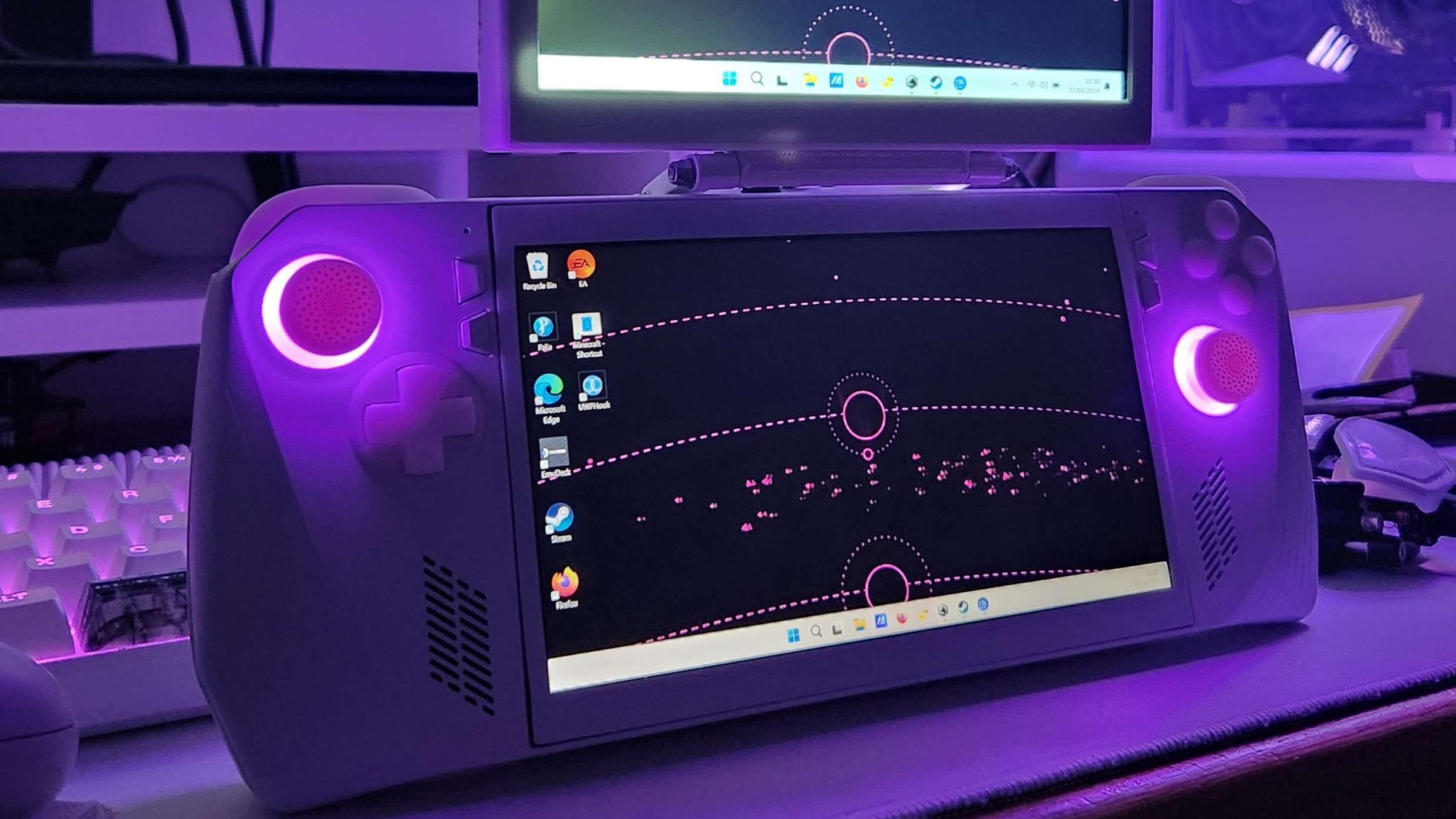
The world of handheld computing, specifically the portable PC gaming segment, is undergoing a revolution. Devices like the Asus ROG Ally have captured the hearts of many tech enthusiasts and gamers worldwide, including us at Repiw.com. Its main appeal lies in the ability to bring PC-class gaming performance anywhere, offering unprecedented flexibility. However, behind the performance and compact design, there’s always room for improvement, especially regarding the user experience of more complex operating system interfaces.
One common limitation often voiced by ROG Ally users is the screen size. The 7-inch 1080p panel, while sharp and immersive for gaming sessions, sometimes feels restricted when the device is repurposed as a true Windows mini-PC. Navigating the desktop interface, managing multiple application windows, or even simply opening productivity apps can be challenging. This is where community innovation comes into play. A creative modder has found a brilliant solution to this problem, creating a ‘clamshell’ modification that adds an external touchscreen, effectively doubling the ROG Ally’s screen space and unlocking new dimensions in its functionality.
Overcoming Screen Limitations: An Innovative Solution from the Community
Kira Patel, a modder skilled in the fusion of technology and 3D design, is the mastermind behind this breakthrough (via reports from Hot Hardware). By combining readily available components with 3D-printed designs of her own, Patel successfully created a screen extension that changes how we view the ROG Ally’s potential. This modification not only adds visual workspace, but also showcases the strong ‘do-it-yourself’ (DIY) spirit within the tech community.
The core concept is simple yet ingenious: if one screen isn’t enough, add another. The additional screen used is a relatively affordable 7-inch 1024×600 resolution portable IPS panel. These screens are usually marketed as accessories for projects like Raspberry Pi, highlighting how versatile components can be adapted for entirely new purposes with a little creativity.
Technical Details: Connecting Two Visual Worlds
Putting this idea into practice was certainly not without technical challenges. The first hurdle to overcome was the port compatibility issue. The ROG Ally natively supports external monitors via its USB Type-C port. Meanwhile, the small portable screen chosen by Patel uses an HDMI connection. This is a common dilemma in the gadget world, where different connectivity standards can be a barrier.
Patel elegantly overcame this: using a USB-to-HDMI adapter. However, she didn’t just plug the adapter in externally. To achieve a neater and more compact integration, the adapter was disassembled to its core components and then installed internally within the additional screen casing. This step demonstrates a dedication to functional and minimalist design as much as possible, although with some aesthetic compromises that the modder herself describes further.
Functional Design: Clamshell System and Portable Stand
Once the connectivity issue was resolved, the next challenge was how to ergonomically and practically integrate this second screen into the ROG Ally. This is where Patel’s 3D design skills shone. She designed a stand that works like a clamshell system.
This stand not only supports the additional screen, but also has several clever functions:
- Folding System: When the additional screen is not needed, the stand can be folded back, keeping the device compact and portable.
- Stand Function: When folded back, this stand also serves as a sturdy stand for the ROG Ally, allowing the user to place the device on a table for gaming sessions or watching content.
- Screen Extension: When needed, the screen can be flipped up and positioned above the main ROG Ally screen, creating an intuitive dual-screen configuration.
The design is quite streamlined, consisting of only five parts that anyone with a suitable 3D printer can replicate. The design files are also publicly available on Thingiverse, a 3D model sharing platform, encouraging the spirit of collaboration and innovation within the DIY community.
Accessibility of Modifications and the DIY Spirit
For those interested in trying this modification themselves, the complete instructions are available on GitHub. This might sound intimidating to some, considering GitHub is generally known as a repository for coding projects. However, Patel assures that this modification does not require any programming expertise.
This project also doesn’t demand much in the way of complex cable reinstallation. Instead, all that’s needed is a little cutting, some adhesive (glue), and, most importantly, a willingness to slightly disregard the perfect aesthetics typically found on manufactured products. The modder herself states that this project is “more for fun than anything else,” a sentiment familiar to DIY enthusiasts who prioritize function and the challenge of construction over a smooth appearance.
In the world of modifications, there are often trade-offs between functionality and aesthetics. This clamshell modification may not look like a product that came out of an Asus factory, but its aim is to provide functionality that the original device doesn’t offer. This highlights the philosophy of modding: the ability to personalize and expand the device’s capabilities according to individual needs, even if it means sacrificing a little visual perfection.
Limitations and Potential for Future Improvements
As with any DIY project, this modification also has some limitations. One visible one is the possibility that the additional screen cannot be permanently connected to the Ally’s USB port because the existing design doesn’t seem to provide access to the charging port on the USB-HDMI adapter. However, this isn’t a major problem; for modders accustomed to challenges, finding a solution to a problem like that is likely not too difficult.
The presence of this modification also raises interesting questions about the potential for further development. It would be very interesting to see if any other modders can develop a better way to expand the ROG Ally’s display capabilities. For example, another 1080p panel would be an ideal choice to maintain resolution consistency, but finding a high-resolution screen that’s super sleek and lightweight is a real technical challenge.
However, despite these limitations, this modification already offers a significant improvement. Imagine playing casual games like Stardew Valley on one screen while watching your favorite movies or series on the other. This is a level of multitasking that was previously unthinkable on a device the size of the ROG Ally, opening up new opportunities for entertainment and productivity on the go.
Inspiration for the Future of the Industry
Modifications like this aren’t just hobby projects; they are an important barometer of user needs and desires. They show what the community really wants and how they innovate when manufacturers haven’t (or can’t) provide it. This Kira Patel modification for the ROG Ally has the potential to inspire Asus itself.
Perhaps one day, Asus will release an official accessory for the ROG Ally that offers similar functionality, providing a more integrated and seamless dual-screen experience. This is the power of modders: they are grassroots innovators who push the boundaries of possibility, often becoming the genesis of new features that are ultimately adopted by major industries. They prove that with creativity and a little courage, there are almost no limits to what can be achieved in the world of technology.












